See also .. HTML Table Options
Menu Item - Internet / Web / File Options
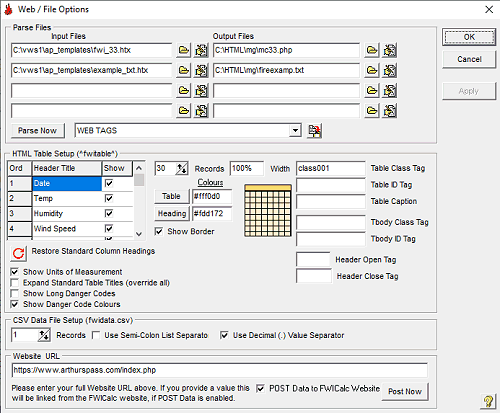
FWI CALCULATOR is capable of "parsing" up to 4 selected files to include FWI type data etc. Parsing means the application reads through the file/s progressively replacing "control tags" with the required data then outputing the file to a new file.
PARSE FILES
Input Files: These files will basically be a text or HTML style file containing a version of the final (output) files you wish to produce. They should contain "parse tags", as required, which will be replaced with the specified data etc. A drop down list contains all the current parse tags available (eg. ^fwifwi^); you may choose a tag in this list then click the  button to copy them to the Windows clipboard.
The file must be an ascii/text file and can be named anything. Browse to them with the  button. View/Edit these files with the
  button.
Example...
<!DOCTYPE HTML PUBLIC "-//W3C//DTD HTML 4.0 Transitional//EN">
<html>
<head>
<title>My Fire Weather Page</title>
<meta name="description" content="FWI Data for Arthur's Pass, New Zealand">
<meta name="keywords" content="fire,fwi,arthur's pass">
<style type="text/css">
.class001 {font-size: 10pt;}
</style>
</head>
<body bgcolor="#ffffff" text="#000000" link="#0000ff" vlink="#800080">
<p>The following is FWI Data for the ^fwistation^ weather station.</p>
<p>Last Updated: ^fwitime^</p>
^fwitable^
</body>
</html>
All the ^fwi...^, ^sta...^ or ^unit...^ tags are the special parse tags required by FWI CALCULATOR. A list follows...
Data Tags
1) ^fwifwi^ - Last FWI
2) ^fwibui^ - Last BUI
3) ^fwiisi^ - Last ISI
4) ^fwidc^ - Last FWI DC
5) ^fwidmc^ - Last DMC
6) ^fwiffmc^ - Last FFMC
7) ^fwicbi^ - Last Chandler Burning Index
8) ^fwicbimon^ - Monthly Chandler Burning Index
9) ^fwiang^ - Last Angstrom Index
10) ^fwifmi^ - Last FMI
11) ^fwiffdi^ - Last FFDI
12) ^fwigfdi^ - Last GFDI
13) ^fwidf^ - Last Drought Factor
14) ^fwibkdi^ - Last BKDI Metric
15) ^fwibkdiimp^ - Last BKDI Imperial
16) ^fwiffm^ - Last Forest Fuel Moisture
17) ^fwiffh^ - Last Forest Flame Height
18) ^fwifsd^ - Last Forest Spotting Distance
19) ^fwifros^ - Last Forest Rate Of Spread
20) ^fwiggm^ - Last Grass Fuel Moisture
21) ^fwigros^ - Last Grass Rate of Spread
22) ^fwidate^ - Last Date
23) ^fwitemp^ - Last Temperature
24) ^fwihumid^ - Last Humidity
25) ^fwiwind^ - Last Wind Speed
26) ^fwirain^ - Last Rainfall Amount
27) ^fwipeaktemptime^ - Last Peak Temperature Time
28) ^fwipeakwindtime^ - Last Peak Wind Time
29) ^fwipeaklowhumidtime - Last Peak Low Humid Time
30) ^fwipeaktemp^ - Last Peak Temperature
31) ^fwipeakhumid^ - Last Peak Humidity
32) ^fwipeakwind^ - Last Peak Wind Speed
33) ^fwipeaklowhumid^ - Last Peak Low Humid
34) ^fwihemis^ - Weather Station Hemisphere
35) ^fwicountry^ - Weather Station Country
36) ^fwistation^ - Weather Station Name
37) ^fwiheight^ - Weather Station Altitude
38) ^fwilong^ - Weather Station Longitude
39) ^fwilat^ - Weather Station Latitude
40) ^fwitime^ - Computer Time / Date
41) ^fwigfdc^ - Last Grassland Fire Danger Code
42) ^fwisfdc^ - Last Scrubland Fire Danger Code
43) ^fwiffdc^ - Last Forest Fire Danger Code
44) ^fwigfdcl^ - Long Grassland Fire Danger Code
45) ^fwisfdcl^ - Long Scrubland Fire Danger Code
46) ^fwiffdcl^ - Long Forest Fire Danger Code
47) ^fwigfdckw^ - Last Grassland Fire Intensity kW
48) ^fwisfdckw^ - Last Scrubland Fire Intensity kW
49) ^fwiffdckw^ - Last Forest Fire Intensity kW
50) ^fwifwidc^ - Last FWI Fire Danger Code
51) ^fwifwidcl^ - Last FWI Long Fire Danger Code
52) ^fwiffdidc^ - Last FFDI Fire Danger Code
53) ^fwiffdidcl^ - Last FFDI Long Fire Danger Code
54) ^fwigfdidc^ - Last GFDI Fire Danger Code
55) ^fwigfdidcl^ - Last GFDI Long Fire Danger Code
56) ^fwicbidc^ - Last CBI Danger Code
57) ^fwicbidcl^ - Last CBI Long Danger Code
58) ^fwicbimondc^ - Monthly CBI Danger Code
59) ^fwiangdc^ - Last Angstrom Danger Code
60) ^fwiangdcl^ - Last Angstrom Long Danger Code
61) ^fwibkdidc^ - Last BKDI Drought Code
62) ^fwifors^ - Forest Slope Setting
63) ^fwifort^ - Forest Type Setting
64) ^fwiforfl^ - Forest Fuel Load
65) ^fwiforar^ - Average Annual Rainfall
66) ^fwiscrs^ - Scrubland Slope Setting
67) ^fwiscrh^ - Srubland Height Setting
68) ^fwigras^ - Grassland Slope Setting
69) ^fwigrac^ - Grassland Curing Setting
70) ^fwigrafl^ - Grassland Fuel Load
71) ^fwiffcol^ - Forest Fire Danger Web Colour
72) ^fwisfcol^ - Scrubland Fire danger Web Colour
73) ^fwigfcol^ - Grassland Fire Danger Web Colour
74) ^fwifwicol^ - FWI Fire Danger Web Colour
75) ^fwiffdicol^ - FFDI Fire Danger Web Colour
76) ^fwigfdicol^ - GFDI Fire Danger Web Colour
77) ^fwicbicol^ - Last CBI Web Colour
78) ^fwicbimoncol^ - Monthly CBI Web Colour
79) ^fwiangcol^ - Last Angstrom Web Colour
Statistic Tags
80) ^stadrou^ - Number of drought days
81) ^stahtemp^ - High temperature
82) ^stahtempd^ - High temperature date
83) ^stahhumid^ - High humidity
84) ^stahhumidd^ - High humidity date
85) ^stahwind^ - High wind speed
86) ^stahwindd^ - High wind speed date
87) ^stahrain^ - High rainfall
88) ^stahraind^ - High rainfall date
89) ^stahpeaktemp^ - High Peak Temp
90) ^stahpeaktempdt^ - High Peak Temp Date/Time
91) ^stahpeakwind^ - High Peak Wind
92) ^stahpeakwinddt^ - High Peak Wind Date/Time
93) ^stahffmc^ - High FFMC
94) ^stahffmcd^ - High FFMC date
95) ^stahdmc^ - High DMC
96) ^stahdmcd^ - High DMC date
97) ^stahdc^ - High DC
98) ^stahdcd^ - High DC date
99) ^stahisi^ - High ISI
100) ^stahisid^ - High ISI date
101) ^stahbui^ - High BUI
102) ^stahbuid^ - High BUI date
103) ^stahfwi^ - High FWI
104) ^stahfwid^ - High FWI date
105) ^stahcbi^ - High CBI
106) ^stahcbid^ - High CBI date
107) ^stahang^ - High Angstrom
108) ^stahangd^ - High Angstrom date
109) ^stahfmi^ - High FMI
110) ^stahfmid^ - High FMI date
111) ^stahffdi^ - High FFDI^
112) ^stahffdid^ - High FFDI date
113) ^stahgfdi^ - High GFDI
114) ^stahgfdid^ - High GFDI date
115) ^stahdf^ - High Drought Factor
116) ^stahdfd^ - High Drought Factor date
117) ^stahbkdi^ - High BKDI
118) ^stahbkdid^ - High BKDI date
119) ^staltemp^ - Low temperature
120) ^staltempd^ - Low temperature date
121) ^stalhumid^ - Low humidity
122) ^stalhumidd^ - Low humidity date
123) ^stalwind^ - Low wind speed
124) ^stalwindd^ - Low wind speed date
125) ^stalrain^ - Low rainfall
126) ^stalraind^ - Low rainfall date
127) ^stalpeaklowhumid^ - Peak Low Humid
128) ^stalpeaklowhumiddt^ - Peak Low Humid Date/Time
129) ^stalffmc^ - Low FFMC
130) ^stalffmcd^ - Low FFMC date
131) ^staldmc^ - Low DMC
132) ^staldmcd^ - Low DMC date
133) ^staldc^ - Low DC
134) ^staldcd^ - Low DC date
135) ^stalisi^ - Low ISI
136) ^stalisid^ - Low ISI date
137) ^stalbui^ - Low BUI
138) ^stalbuid^ - Low BUI date
139) ^stalfwi^ - Low FWI
140) ^stalfwid^ - Low FWI date
141) ^stalcbi^ - Low CBI
142) ^stalcbid^ - Low CBI date
143) ^stalang^ - Low Angstrom
144) ^stalangd^ - Low Angstrom date
145) ^stalfmi^ - Low FMI
146) ^stalfmid^ - Low FMI date
147) ^stalffdi^ - Low FFDI
148) ^stalffdid^ - Low FFDI date
149) ^stalgfdi^ - Low GFDI
150) ^stalgfdid^ - Low GFDI date
151) ^staldf^ - Low Drought Factor
152) ^staldfd^ - Low Drought Factor date
153) ^stalbkdi^ - Low BKDI
154) ^stalbkdid^ - Low BKDI date
155) ^staraind^ - Number consecuative days of rain
156) ^staraint^ - Amount of rain
Current Year Statistic Tags
157) ^stayrain^ - Current year rainfall
158) ^stayraindays^ - Current year rain days
159) ^staydroudays^ - Current year drought days
160) ^stayhighrain^ - Current year high rain
161) ^stayhighraind^ - Current year high rain date
162) ^stayhightemp^ - Current year high temp
163) ^stayhightempd^ - Current year high temp date
164) ^staylowtemp^ - Current year low temp
165) ^staylowtempd^ - Current year low temp date
166) ^stayhighhumid^ - Current year high humid
167) ^stayhighhumidd^ - Current year high humid date
168) ^staylowhumid^ - Current year low humid
169) ^staylowhumidd^ - Current year low humid date
170) ^stayhighwind^ - Current year high wind
171) ^stayhighwindd^ - Current year high wind date
172) ^staylowwind^ - Current year low wind
173) ^staylowwindd^ - Current year low wind date
174) ^stayhpeaktemp^ - Current year peak max temp
175) ^stayhpeaktempdt^ - Current year peak max temp 176) ^stayhpeakwind^ - Current year peak max wind
177) ^stayhpeakwinddt^ - Current year peak max wind 178) ^staylpeaklowhumid^ - Current year peak low humid
179) ^staylpeaklowhumiddt - Current year peak low humid date/time
180) ^stayhighffmc^ - Current year high FFMC
181) ^stayhighffmcd^ - Current year high FFMC date
182) ^staylowffmc^ - Current year low FFMC
183) ^staylowffmcd^ - Current year low FFMC date
184) ^stayhighdmc^ - Current year high DMC
185) ^stayhighdmcd^ - Current year high DMC date
186) ^staylowdmc^ - Current year low DMC
187) ^staylowdmcd^ - Current year low DMC date
188) ^stayhighdc^ - Current year high DC
189) ^stayhighdcd^ - Current year high DC date
190) ^staylowdc^ - Current year low DC
191) ^staylowdcd^ - Current year low DC date
192) ^stayhighisi^ - Current year high ISI
193) ^stayhighisid^ - Current year high ISI date
194) ^staylowisi^ - Current year low ISI
195) ^staylowisid^ - Current year low ISI date
196) ^stayhighbui^ - Current year high BUI
197) ^stayhighbuid^ - Current year high BUI date
198) ^staylowbui^ - Current year low BUI
199) ^staylowbuid^ - Current year low BUI date
200) ^stayhighfwi^ - Current year high FWI
201) ^stayhighfwid^ - Current year high FWI date
202) ^staylowfwi^ - Current year low FWI
203) ^staylowfwid^ - Current year low FWI date
204) ^stayhighcbi^ - Current year high CBI
205) ^stayhighcbid^ - Current year high CBI date
206) ^staylowcbi^ - Current year low CBI
207) ^staylowcbid^ - Current year low CBI date
208) ^stayhighang^ - Current year high Angstrom
209) ^stayhighangd^ - Current year high Angstrom date
210) ^staylowang^ - Current year low Angstrom
211) ^staylowangd^ - Current year low Angstrom date
212) ^stayhighfmi^ - Current year high FMI
213) ^stayhighfmid^ - Current year high FMI date
214) ^staylowfmi^ - Current year low FMI
215) ^staylowfmid^ - Current year low FMI date
216) ^stayhighffdi^ - Current year high FFDI
217) ^stayhighffdid^ - Current year high FFDI date
218) ^staylowffdi^ - Current year low FFDI
219) ^staylowffdid^ - Current year low FFDI date
220) ^stayhighgfdi^ - Current year high GFDI
221) ^stayhighgfdid^ - Current year high GFDI date
222) ^staylowgfdi^ - Current year low GFDI
223) ^staylowgfdid^ - Current year low GFDI date
224) ^stayhighdf^ - Current year high DF
225) ^stayhighdfd^ - Current year high DF date
226) ^staylowdf^ - Current year low DF
227) ^staylowdfd^ - Current year low DF date
228) ^stayhighbkdi^ - Current Year high BKDI
229) ^stayhighbkdid^ - Current Year high BKDI date
230) ^staylowbkdi^ - Current Year low BKDI
231) ^staylowbkdid^ - Current Year low BKDI date
Unit Tags
232) ^unittemp^ - Unit of Temperature
233) ^unitwind^ - Unit of Windspeed
234) ^unitdist^ - Unit of Distance
235) ^unithum^ - Unit of Humidity
236) ^unitrain^ - Unit of Rainfall
237) ^unitfuel^ - Unit of Fuel Load
Miscellaneous Tags
239) ^timeoffset^ - FWI Time Offset (ST or DLST)
240) ^fwiversion^ - FWI Calc Version
241) ^fwifirst^ - FWI First Data Date
242) ^fwidateday^ - Last Date Day
243) ^fwidatemon^ - Last Date Month
244) ^fwidateyear^ - Last Date Year
245) ^fwidatelong^ - Last Date Long Format
Redundant Tags
246) ^fwifwidcau^ - Use ^fwiffdidc^
247) ^fwifwidcaul^ - Use ^fwiffdidcl^
248) ^fwifwicolau^ - Use ^fwiffdicol^
Output Files: These are the files that FWI CALCULATOR will send the parsed input files to. Please note that it will recreate this file from new with each parse. Do not use spaces in the filename as some server types will not accept filenames in this format. This will most likely have a web type file extension (htm, html, php, txt etc). These files could be transfered to a remote server by FTP (File Transfer Protocol) after they have been parsed (see FTP File List). Browse to them with the button. View/Edit these files with the button (remember these files will be overwritten with each parse).
Parse Now: Clicking this button will parse all the input files immediately, overwriting all output files. No new data processing occurs.
HTML TABLE SETUP OPTIONS
A HTML table can be included in your parsed files (^fwitable^) which contains the lastest records from the database.
Table Headings: You can edit the text used as the column title (limit is 70 characters and you can use HTML tags) and choose which columns to display by checking the checkboxes for the required Column Heading. The order the columns also appear can be changed by clicking on the Ord. column number and dragging it to its new location.
 Restore Standard Column Headings: Clicking this button will change all Column Titles to their standard presentation (ie. no user title text).
Records: Select maximum number of records to show in table (1-200).
Width: Enter either number of pixels wide (eg. 750) or a percentage value of web page width (eg. 100%).
Table Class Tag: Enter a Cascading Style Sheet (CSS) class (eg. class001) that can be used to format the table. Maximum of 30 characters. Do not include period (.).
Table ID Tag: Enter a ID(eg. id001) that can be used by JavaScript etc to access the table. Maximum of 30 characters. Do not include period (.).
Table Caption: Enter text that will appear in a caption above the table. Text formatting HTML tags are permitted.
Tbody Class Tag: Enter a Cascading Style Sheet (CSS) class (eg. class002) that can be used to format the body of the table. Maximum of 30 characters. Do not include period (.).
Tbody ID Tag: Enter a ID(eg. id002) that can be used by JavaScript etc to access the body of the table. Maximum of 30 characters. Do not include period (.).
Heading Open Tag: If you want to format the title text you can place the opening HTML tag here eg. <h3> All <th> cells will be modified.
Heading Close Tag: If you want to format the title text you can place the closing HTML tag here eg. </h3> All <th>cells will be modified.
Colours - Table: Selects the table body colour. Enter a valid HTML color tag (eg. #ffbf80) or click the Table button or image to open a colour dialog box.
Colours - Heading: Selects the table header colour. Enter a valid HTML color tag (eg. #ffbf80) or click the Heading button or image to open a colour dialog box.
Show Border: When Show Border is checked the table will contain a grid of 1 pixel lines between all record fields (ie. border=1), otherwise no gridlines (borders) are visible.
Show Units of Measurement When checked units of measurement will appear in the column headings for Temerature, Humidity, Windspeed, Rainfall, FFDC, SFDC and GFDC.
Expand Standard Table Headings: When checked the table headings will be expanded (eg. FWI = Fire Weather Index, FFDC = Forest Fire Danger Code etc ). This overrides edited Column Titles.
Show Long Danger Codes: When checked Danger Codes (LW,MD,HI etc) will be expanded to their long form (LOW, MODERATE, HIGH etc). If you have edited the long form in the Colour Scheme dialog these edited values will be displayed.
Show Danger Code Colours: If checked, cells containing Danger Codes (LW,MD, HI etc) will have a background colour as chosen in the Colour Scheme dialog.