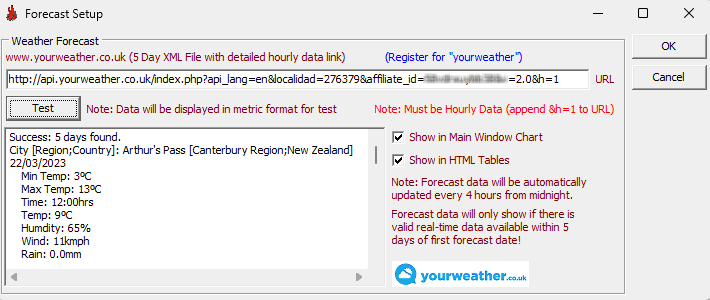
Menu Item - Internet / Forecast Setup
FWICalc can query weather forecasts for a location near your station from www.yourweather.co.uk. FWICalc will then provide forecast Fire Weather indices for 4 to 5 days into the future based on the weather readings obtained. These can be displayed in FWI Charts or on the main window chart.
Create a yourweather account & obtain 5 Day Data XML File
1) Visit https://www.yourweather.co.uk/api/ (Cookies MUST BE enabled to use this site)
2) Select the Register link at the base of the login dialog.
3) Fill in your registration details for the Weather API.
4) Log into your yourweather account.
5) Select the "ONE LOCATION" tab.
6) Search for a location at or near your weather station location.
7) Once a valid location is selected the various file options will populate. Copy the URL associated with XML file with the 5-day forecast and detailed hourly information. Paste this URL into the FWICalc Forecast Setup dialog in the URL edit box.
8) Click the Test button. You should see 5 days worth of weather data for the midday readings. FWICalc will attempt to retrieve weather data for midday (12:00hrs), however failing this it will retrieve data in this priority order... 13:00hrs, 14:00hrs, 11:00hrs, 15:00hrs, 10:00hrs.
Choose where to display forecast FWI data
FWICalc will query the weather forecast file every four hours. The data obtained can be shown on charts only. Select where you would like it shown by checking the checkboxes...