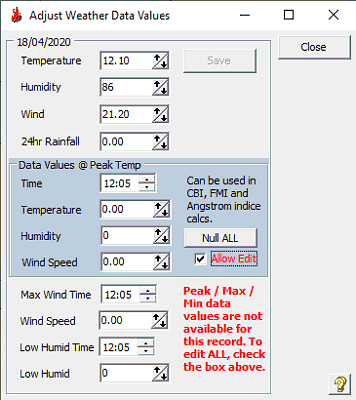
Chart Menu Item - Adjust Weather Data Values
From time to time it may be necessary to adjust the Weather Data Values (Temperature, Humidity, Windspeed, Rainfall, Max Temp, Humidity and Windspeed @ Max Temp. Time, Max Windspeed, and Low Humidity) of a database record. You can also edit weather data into a Fudge Record.
To edit a data record, right-click the entry on the frontpage chart, and select Adjust Weather Data Values. A dialog will open displaying the current weather data for that day. You may adjust the values as required.
If FWICalc is not reading weather data every 15 minutes then Peak / Max / Min data values will not be available. You can however edit them by clicking on the Checkbox indicated - NOTE: YOU MUST EDIT ALL PEAK/MAX/MIN VALUES! Clicking the Null ALL button will remove the Peak / Max / Min values.
Click Save to alter the database. You will be asked whether you want to overwrite the data. You will next be asked whether you want the database recalculated (if you answer Yes, it will be recalculated from the point of the adjusted data forward).
Note : This weather data will effect all indexes.