File Functions
Saving your data
When you exit the application, or the Application creates new records, or you change something the new data is automatically saved.
Note: as FWICalc is designed to standalone, and run 24/7 there should be little need to save or open files. FWICalc uses "default.fwi" as its default database, you may SaveAs a different name if required, or Open someone elses FWI data file. FWI data files are version dependant.
Import CSV File
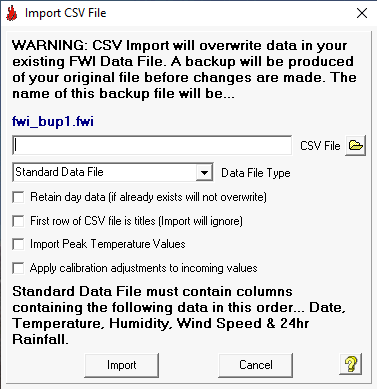
FWICalc can import data to its main database from either a Standard Data File (CSV format) created by the user, or can upload data files created by either VWS or Cumulus weather software.
The Standard Data File is a "Comma Separated Value" file (CSV) can be uploaded to FWICalc. The CSV file must contain data in the following order per line... Date (in the same format as FWICalc), Temperature, Humidity, Wind Speed, Daily Rainfall and optionally Peak Temperature. The values can be separated by commas or semi-colons (this will depend on your countries decimal protocols). FWICalc will automatically create a backup file of your original data (eg. fwi_bup3.fwi), this will be saved in the installation folder of FWICalc (eg. C:\program files\FWI).
FWICalc will re-calculate all FWI values in the database after the import is complete.
1) Choose a valid CSV, VWS (eg. dbase.csv) or Cumulus (eg. jan12log.txt) Data File.
2) Choose the type of file to be uploaded (Standard, VWS, Cumulus). Note: If you choose incorrectly corrupted data may be uploaded!
3) Select whether original weather data will be retained or not. The default is un-checked ie. Overwrite existing data!
4) Select whether 1st row of CSV File contains titles.
5) Select whether you want to import Peak Temperature Values.
6) Select whether to apply calibration adjustments to incoming values.
7) Click the Import button. Note: this can be a lengthy process. CSV file data will be checked (date ranges, data ranges etc), and inserted into the database.
Export CSV File
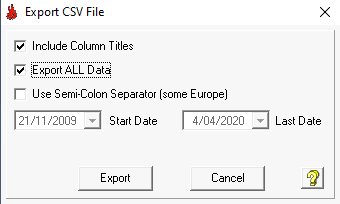
You can export all or part of the FWI data file as a "Comma Separated Value" file (CSV). This is useful if you wish to use the data in spreadsheet applications (eg. MS Excel). In the dialog, choose whether you need column titles, whether to export all data or just a date range, and whether you wish to use semi-colons as the separator character (some of Europe). When you click the Export button you will asked to choose a file name.
Information
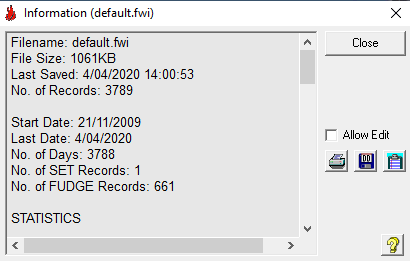
Opens a dialog displaying information and statistics of the FWI Data File. If you wish to insert your own text or edit information before printing select the Allow Edit checkbox. Right-clicking on the information window will open the general editing menu (Copy, Cut, Paste Select All etc).
Recalculate Database : This function will recalcul;ate ALL values and data in the database based on the current Initial Values, Settings and Environment variables. Use with caution!